
TV-Sizes journal
Floating TV Console: How Wide, Deep & High It Should Be
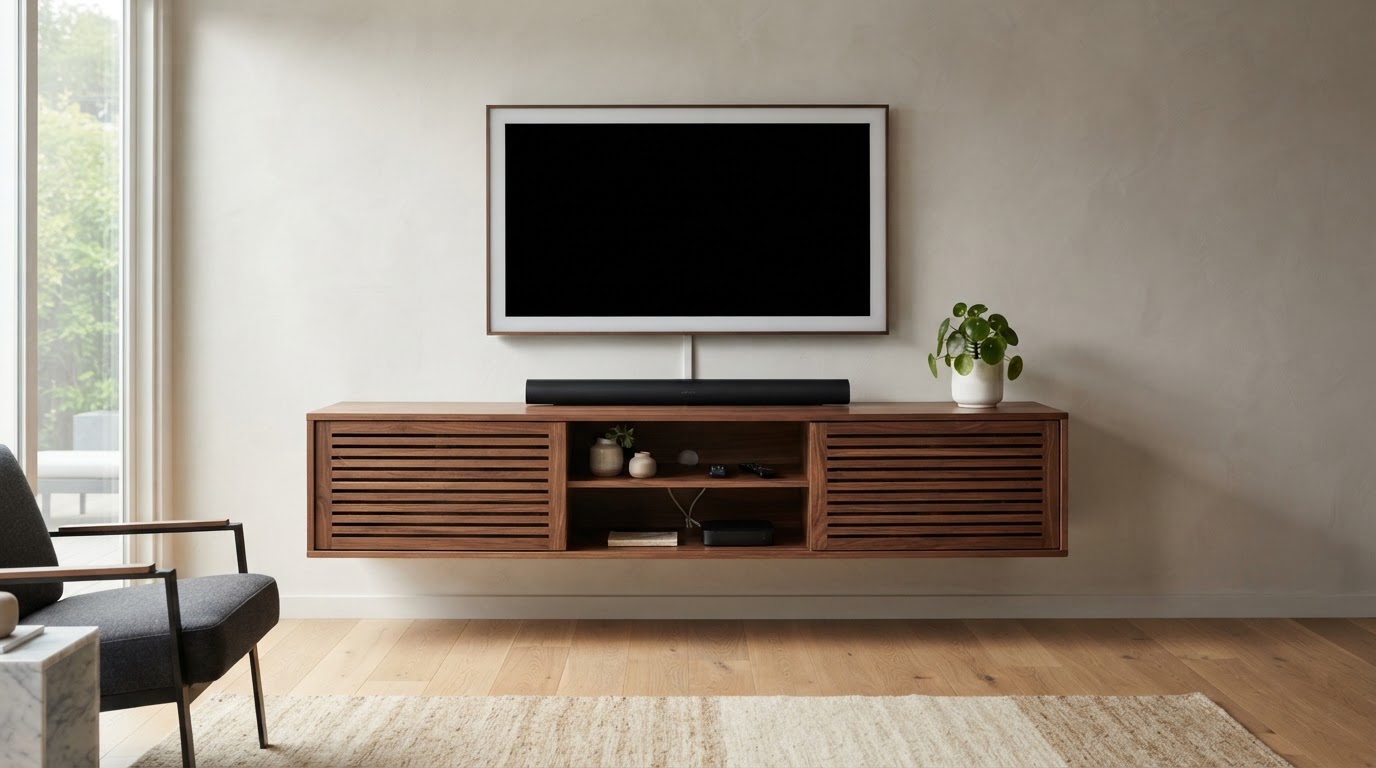
Floating TV Console: How Wide, Deep and High It Should Be
A floating TV console is a wall-mounted media cabinet — normally an enclosed unit with doors, drawers or an open center — that hangs on the wall with a visible gap above the floor. It is the storage-first cousin of the floating TV stand: instead of a slim shelf, a console is deep enough to hold components and wide enough to read as furniture.
Because the whole unit is suspended from the wall, three dimensions decide whether it works, and each one answers to a different thing:
- Width is about your TV — and, if the TV sits on top, its feet.
- Depth is about the gear you store inside and what sits on the surface.
- Height is about your eyes, not the television.
This guide works through all three using real TV measurements from the tv-sizes database, real console dimensions from current listings, and the load and mounting rules that keep a floating console safely on the wall.
Quick answers
| Question | Short answer |
|---|---|
| How wide should a floating TV console be? | At least as wide as the TV's real chassis; 6–12 in wider than the TV is the balanced target. If the TV sits on top, the console must also be at least as wide as the TV's feet. |
| How deep should it be? | 11–14 in for streamers, routers and slim boxes; 15–18 in if you want to fit an AV receiver. Add an inch or two behind for cables and in front for door swing. |
| How high do you mount it? | With the TV wall-mounted above, aim for the screen center at seated eye level (about 42 in) and leave a 6–10 in gap between the console top and the TV. That usually puts the console top between roughly 14 and 24 in off the floor, depending on TV size. |
| Can it hold the TV? | Yes, if the TV's feet fit fully on the top surface and the unit is rated for the combined load. Most people wall-mount the TV and let the console carry only the gear. |
| Will any wall work? | No. A loaded console needs studs, or masonry, or anchors rated for the full load. Several floating consoles state they are for solid walls only and not for cavity/plasterboard mounting. |
What counts as a floating TV console?
The words overlap on retailer pages, so it helps to separate the three wall-mounted products this site covers:
| Product | Typical depth | Structure | Main job |
|---|---|---|---|
| Floating TV shelf | 6–10 in | One open slab | Hold a soundbar or a couple of small boxes |
| Floating TV stand | 8–12 in | Open frame or slim cabinet | Hold gear and/or carry a TV on top |
| Floating TV console | 11–18 in | Enclosed cabinet with doors, drawers or an open bay | House components out of sight and anchor the look under the TV |
The console is the piece you buy when the goal is storage: doors and drawers hide the tangle, and the extra depth is what lets an AV receiver, a game console or a stack of boxes live inside. That depth is also the specification most buyers get wrong, so we treat it as a first-class number below.
If you are weighing a console against a stack of floating shelves under a TV, the trade is simple: shelves are lighter, cheaper and easier to hang, while a console hides more and gives you a surface for a soundbar.
Width: how wide should a floating TV console be?
There are two arrangements, and they use different arithmetic.
The TV is wall-mounted above the console. The console carries no screen, so its width is a proportion choice. The console should look deliberate under the TV rather than like a leftover sideboard. In practice that means starting at roughly the TV's own width and, for the most balanced look, adding 6–12 inches so the cabinet has a little overhang on each side.
The TV sits on top of the console. Now the console is a TV stand, and the hard constraint is the feet. TV feet come in two families: a center pedestal (narrow, often 17–30 in) or edge legs near the corners (nearly the full chassis width). A center pedestal can sit on a console much narrower than the TV; edge legs need a console essentially as wide as the TV. Measure the outer edge of each foot before you buy.
Console width chart by TV size
The "65-inch" label is the screen diagonal, not the width. The table uses the theoretical 16:9 screen width (geometry only), the real chassis width measured in the tv-sizes database, and then builds console-width bands on top of the real chassis width.
| TV class | Theoretical 16:9 screen width | Real chassis width (tv-sizes database) | Minimum console width | Balanced (TV + 6–12 in) | Generous (TV + 18–24 in) |
|---|---|---|---|---|---|
| 43" | 37.5 in | 38–39 in | 39–42 in | 44–50 in | 56–62 in |
| 50" | 43.6 in | 44–45 in | 45–48 in | 50–57 in | 62–69 in |
| 55" | 47.9 in | 48–49 in | 49–52 in | 54–61 in | 66–73 in |
| 65" | 56.7 in | 57–58 in | 58–62 in | 63–70 in | 75–82 in |
| 75" | 65.4 in | 66–67 in | 67–70 in | 72–79 in | 84–91 in |
| 85" | 74.0 in | 76 in | 76–80 in | 82–88 in | 94–100 in |
The theoretical column is 16:9 screen geometry calculated from the diagonal — not a chassis measurement. The chassis column is what the physical TV actually measures. Console widths are design guidance, not standards.
A widely repeated styling rule says a media console should be about 12 inches wider than the TV (6 in per side). That sits at the top of the balanced band above and is a good default for a large wall-mounted screen. Console brands also express the same idea as size bands: one current guide pairs a 65 in TV with a 60–72 in console and a 75 in TV with a 70–84 in console, which lands inside the balanced and generous columns above. The shared principle is to give the screen visual breathing room so the cabinet does not read as a sliver.
Theoretical screen sizes and real model widths are catalogued across the screen size comparison and in the size archives below. To test a specific console against a specific TV, the site's fit calculator does the comparison.
Fit calculator
Measure the furniture.
We’ll size the screen.
Enter the clear inside width of your cabinet and the usable width of its base.
Depth: the specification consoles get wrong
Width gets the attention; depth decides whether your gear actually fits. A console that is too shallow forces you to leave the receiver on the floor or the door ajar. Depth also sets how far the unit protrudes into the room and how much clearance it needs behind the TV.
| What lives in or on the console | Depth to plan for |
|---|---|
| Streaming stick, Wi-Fi router, slim set-top box | 8–12 in |
| Cable box or DVR sitting flat | 12–14 in |
| Game console, stood or laid flat, with vent clearance | 12–15 in |
| AV receiver | 15–18 in |
| Soundbar on the top surface | 11–15 in console (the bar itself is only 3–5 in deep) |
| Cables behind the unit | add 1–3 in of rear clearance for bends and plugs |
Real enclosed consoles reflect those ranges: the Modway Render 60" wall console is 15.5 in deep, the EXQUAL 71" unit is 15.7 in deep, while slim open consoles such as the HOOBRO 55" are about 11 in deep. A 15–16 in console is the safe choice if you ever want an AV receiver; an 11 in console is for streamers, routers and small boxes only.
Two more depth details matter with doors:
- Door swing. Hinged doors need clear space in front; sliding doors (common on mid-century consoles) do not. Check the direction and radius before you commit a walkway.
- Ventilation. Enclosed consoles can trap heat. Prefer a unit with an open back, vent slots or a partially open bay over a fully sealed box, and leave a little air around game consoles and receivers.
Height: console top, eye level and the under-TV gap
A floating console's height is an ergonomics question, and it is the one point where current advice genuinely disagrees. Some guides recommend a console top around 24–30 in; others argue for 17–22 in for modern, lower-mounted screens. Both can be right, because they describe different setups.
The reliable method is to start from your eyes:
- Pick a screen-center height. Around 42 in from the floor suits most people on a sofa; 40–44 in is the common band, and up to 48 in if you watch from a taller seat or a bar stool.
- Find where the bottom edge of the screen lands:
screen center − (screen height ÷ 2). - Then subtract either the TV-to-console gap (if the TV is wall-mounted above) or the stand height (if the TV sits on the console).
For a wall-mounted-above setup, a 6–10 inch gap between the console top and the bottom of the TV is the practical target: enough for airflow, plug access and a soundbar, without the cabinet drifting far from the screen. The table applies that method to each common size, using theoretical 16:9 screen height and a 42 in screen center.
| TV class | Theoretical screen height | Screen bottom edge at 42 in center | Console top, TV wall-mounted above (6–10 in gap) | Console top, TV sitting on the console (≈3.5 in stand) |
|---|---|---|---|---|
| 43" | 21.1 in | ~31.5 in | 21.5–25.5 in | ~28 in |
| 50" | 24.5 in | ~29.7 in | 19.5–23.5 in | ~26 in |
| 55" | 27.0 in | ~28.5 in | 18.5–22.5 in | ~25 in |
| 65" | 31.9 in | ~26.0 in | 16–20 in | ~22.5 in |
| 75" | 36.8 in | ~23.5 in | 13.5–17.5 in | ~20 in |
| 85" | 41.6 in | ~21.0 in | 11–15 in | ~17.5 in |
These heights are derived from theoretical screen geometry plus eye-level guidance, not from any manufacturer's specification. They also explain the disagreement in the guides: when the TV sits on the console, the console top lands in the mid-20s for a 55–65 in screen, which is why "24–30 in" advice is common. When the TV is wall-mounted above a large screen, the console has to sit much lower to keep the gap sane — which is exactly what the "17–22 in" camp means.
Two practical limits:
- Keep the bottom of the console at least about 4 in off the floor so the float reads as intentional and the floor stays cleanable. With an 85 in TV above, a low console top can push against that floor gap, so many large-screen setups accept a slightly higher screen center or a wider gap.
- If you sit closer than the recommended distance for your screen, your eyes look down more, so the ideal screen center drops a little. Check your room with the viewing-distance guide or the calculator below before drilling.
Viewing distance
How far is your seat?
Use this as a practical starting point, then adjust for your room and preferences.
- Mixed viewing
- 60″
- Cinema / 4K
- 80″
Storage layout, doors and ventilation
A console's width and depth only pay off if the inside is laid out for what you own. Common configurations and what they suit:
- Open bay (no doors). Cheapest and coolest-running; remote controls and IR devices work without opening anything. Best for a single receiver, a router and visible gear, and the layout with the fewest clearance headaches.
- Sliding doors. Hide gear without needing swing room in front. The Modway Render 60" uses two sliding slatted doors with an open, adjustable center shelf and two cable-management holes — a layout that hides clutter while letting remote signals and heat through the slats.
- Hinged doors and drawers. The cleanest look, but hinged doors need clearance in front and drawers need the unit mounted solidly enough to resist the pull. Drawers are best for remotes, controllers and low-weight items, not heavy AV gear.
- Mixed layouts. Doors at the ends and an open center bay is a common compromise: the visible bay holds the device that needs line-of-sight or airflow, and the closed sections hide the rest.
Whatever the layout, choose a unit with a cable path — a hollowed back, a drilled grommet or a recessed channel. The HOOBRO 55" listing, for example, specifically calls out hollowed holes to hide cords inside the stand, and the Modway includes two cable-management holes. Tidy routing stops a floating console from looking like a suspended knot of wires.
Load, mounting and wall type
A floating console has no legs, so every pound of cabinet, gear and television is transferred to the wall through its mounting rail and fasteners. That is the main engineering difference from a floor console, and it deserves more thought than the color finish.
Budget the load. Add the console's own weight, everything you store, and the TV if it sits on top. Some real numbers: the Modway Render 60" console weighs 56 lb by itself and is rated for flat-screen TVs up to 65 in; the EXQUAL 71" unit is rated to support up to 110 lb; the HOOBRO 55" lists a maximum capacity of 220.5 lb; the GHC 43.3" console is rated to 70 lb and is described for a wall-mounted TV up to 65 in. Those figures are the seller's ratings — treat them as ceilings and stay comfortably under them.
Anchor into studs whenever real weight is involved. A 55–70 in loaded console plus gear should catch two or three studs with the brackets. This matters even more for a console with doors and drawers, because pulling a drawer or swinging a door adds leverage at the top edge of the unit that a static weight figure does not describe.
Match the fastener to the wall.
- Drywall over wood studs: lag bolts or heavy screws into studs; drywall anchors alone are for pictures and lightweight shelves.
- Concrete, brick or block: masonry anchors rated for the load; no studs to find.
- Cavity or plasterboard-only walls: several floating consoles explicitly say they are not for this. Check the listing's wall-type note before buying.
- Metal studs: fasteners rated for metal studs; a magnetic stud finder may not work.
- Tiled walls: fix into the substrate behind the tile, not the tile.
If the TV is going to be large or heavy, wall-mounting it independently keeps that weight off the console entirely. See the wall-mount section for the general approach, or the worked example in the Samsung UN50RU7100 fixed wall-mount guide.
Real TVs: the widths and feet you are sizing against
These models are measured in the tv-sizes database. The point of the table is the stand-width spread: the same diagonal can carry a narrow center pedestal or edge legs almost as wide as the chassis, which is what decides whether a TV can sit on a console at all.
| Model (from the database) | Brand | TV width | Stand / feet width |
|---|---|---|---|
| Samsung 43" 4K Ultra HD TV | Samsung | 39 in | 33 in |
| Sony 50" 4K Ultra HD TV | Sony | 45 in | 26 in |
| LG 55" OLED (4K HDR) | LG | 49 in | 17 in |
| Sony 55" OLED (4K HDR) | Sony | 49 in | 49 in |
| Samsung 65" 4K UHD TV with HDR | Samsung | 57 in | 38 in |
| LG 65" 4K Ultra HD TV | LG | 57 in | 52 in |
| VIZIO 65" 4K UHD Home Theater Display with HDR | VIZIO | 58 in | 53 in |
| Sony 75" 4K Ultra HD TV with HDR | Sony | 67 in | 17 in |
| LG 75" 4K Ultra HD TV | LG | 67 in | 68 in |
| Sony 85" 4K UHD TV with HDR | Sony | 76 in | 28 in |
In the database a 75 in class can carry a 17 in center pedestal or 68 in edge legs, and a 65 in class spans 17 in to 61 in of stand width. That is why "will it fit on the console?" can never be answered from the diagonal alone: look up the model's own width and stand width in the 43", 50", 55", 65", 75" or 85" archive, or search the whole database at /tvs/. Brand-level overviews are at Samsung, LG, Sony and VIZIO.
Real floating TV consoles that fit common TV sizes
The products below are real wall-mounted consoles found during research, with dimensions and load figures from their listings. Use them as concrete examples of the widths and depths discussed above — and confirm the current height, capacity and wall-type requirements on the listing before buying.


Related guides on tv-sizes.com
- Wall-mounted furniture in the same family: floating TV stand, floating TV shelf and floating shelves under a TV
- Floor-console sizing by screen size: TV stand for a 65 inch TV, TV stand for a 75 inch TV, TV stand for an 85 inch TV
- TV screen size comparison and the fit calculator
- Viewing distance and height, wall-mount guidance and the whole measured database at /tvs/
Bottom line
Size a floating TV console in three steps. Width: start at the TV's real chassis width and add 6–12 inches for balance; if the TV sits on top, never go narrower than its feet. Depth: 11–14 inches for streamers and routers, 15–18 inches if you want an AV receiver, plus a little rear clearance for cables. Height: put the screen center near seated eye level, keep a 6–10 inch gap between the console and a wall-mounted TV, and let the arithmetic — not a fixed cabinet height — set the console top. Then mount it into studs or solid wall, budget the combined load against the seller's rating, and the console floats exactly where it should.
As an Amazon Associate we earn from qualifying purchases. Price and availability can change.