
TV-Sizes journal
Floating Shelves Under a TV: Width, Spacing & Height Guide
Floating Shelves Under a TV: Width, Spacing & Height Guide
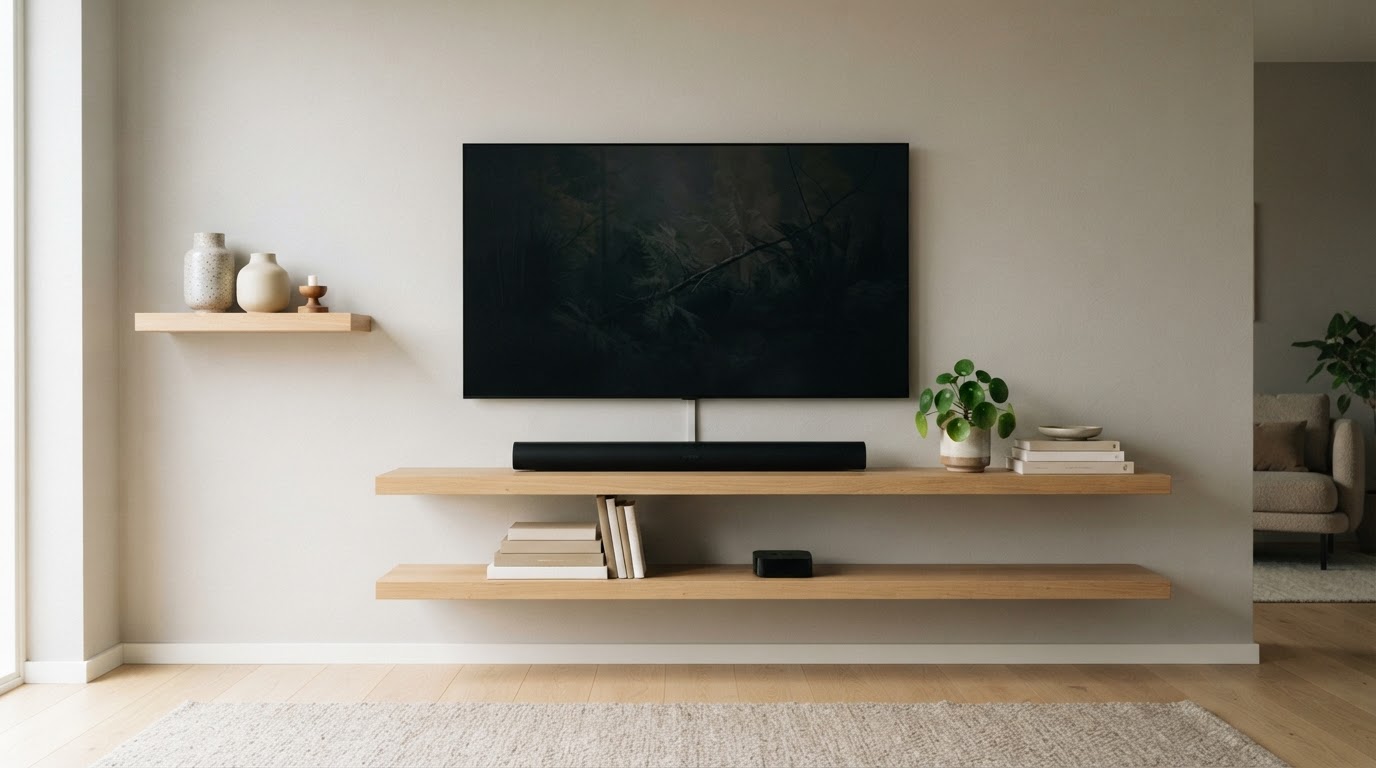
"Floating shelves under a TV" describes a whole look rather than one product: a wall-mounted television with one or more handleless shelves — or a floating cabinet — fixed to the wall beneath it. The TV hangs free, the shelves carry the soundbar, streaming box and decor, and nothing sits on the floor. Most of what is written about the look is decorative. The numbers that make it work — how wide, how high, how far below the screen — rarely get spelled out, so this guide does that math using theoretical screen geometry plus the real measured TV widths in the tv-sizes database.
Quick answers
| Question | Short answer |
|---|---|
| How wide should floating shelves be under a TV? | It depends on the look you want. For an anchored, built-in feel, run the shelf at least as wide as the TV's chassis and ideally a few inches past each side. For a lighter, balanced look, around 75–90% of the chassis width. A single soundbar ledge can be 40–60% and still read as deliberate. |
| How far below the TV should the shelf be? | Leave a 6–12 inch clear gap between the TV's bottom edge and the top shelf. Six inches is the minimum for visual breathing; use 8–12 inches if a soundbar or a tall device sits there. |
| How high off the floor? | Work back from the screen. With the screen center near seated eye level (roughly 42–45 inches), the TV's bottom edge lands about 21–34 inches up depending on size, and the top shelf sits one gap below that — usually around 16–26 inches. |
| How deep should the shelf be? | 8–12 inches for AV gear and a soundbar; 11–16 inches for a floating cabinet or console. |
| How far apart should stacked shelves be? | 8–14 inches between shelf surfaces for books, plants and decor; 14–18 inches if a receiver, game console or other tall object has to stand up. |
| Can the TV sit on the shelves? | Only if the shelf is rated for the full TV weight, anchored into structure, and at least as wide as the TV's feet — which for edge-leg TVs can be nearly the whole chassis width. |
The three things people mean by "floating shelves under a TV"
The phrase covers three different builds, and the sizing logic is not the same for each.
1. A single long floating shelf (a media ledge). One chunky shelf mounted under a wall-mounted TV for a soundbar, a streaming box and a couple of objects. This is the cleanest and lowest-risk version: the TV is mounted independently, so the shelf only carries gear.
2. A stack of floating shelves. Two or three shelves at different heights, sometimes staggered left and right of the TV's centerline. This is the most "decorated" version and the one where spacing between shelves matters most.
3. A floating cabinet or console. A boxed, handleless unit mounted under the TV with doors or drawers for devices and cables. This is what most people mean when they search for a floating cabinet under TV. A cabinet hides gear and cables better than open shelves, but it is deeper and heavier, so the wall fixing matters more.
All three can sit under a TV that is wall-mounted. If the television is going to stand on the shelves instead, treat the shelf as a TV stand — see the feet-width note below.
How wide should floating shelves be under a TV?
Two different widths get confused here, so keep them separate:
- Theoretical 16:9 screen width — pure geometry calculated from the diagonal. It is the number designers usually mean when they say a shelf should "run past the screen." These are theoretical screen dimensions, not measurements of any TV's body.
- Real chassis width — the physical width of the television body, including its bezel, as measured in the tv-sizes database. It is usually a little wider than the theoretical screen because the bezel adds a little, though a few entries in the database measure narrower.
Here is the theoretical 16:9 screen rectangle by common size:
| TV class | Screen width (theoretical 16:9) | Screen height (theoretical 16:9) | Screen area |
|---|---|---|---|
| 32" | 27.9" | 15.7" | 3.0 sq ft |
| 43" | 37.5" | 21.1" | 5.5 sq ft |
| 50" | 43.6" | 24.5" | 7.4 sq ft |
| 55" | 47.9" | 27.0" | 9.0 sq ft |
| 65" | 56.7" | 31.9" | 12.5 sq ft |
| 75" | 65.4" | 36.8" | 16.7 sq ft |
| 85" | 74.1" | 41.7" | 21.4 sq ft |
And here are the real chassis widths from the tv-sizes database, which is what you actually measure against:
| TV class | Most common chassis width | Range in the database |
|---|---|---|
| 32" | 29–31" | 21–37" (a few small or rebadged models sit well below 29") |
| 43" | 38–39" | 38–43" |
| 50" | 44–45" | 44–49" |
| 55" | 49" | 48–51" |
| 65" | 57–58" | 57–64" |
| 75" | 66–67" | 66–67" |
| 85" | 76" | 76" (one model in the database) |
Now you can size the shelf. Three width bands cover almost every floating-shelf-under-TV layout:
| TV class | Anchored / full-width shelf | Balanced shelf | Minimal ledge or offset |
|---|---|---|---|
| 32" | 33–39" | 22–28" | 12–19" |
| 43" | 42–47" | 29–35" | 15–23" |
| 50" | 48–53" | 33–41" | 18–27" |
| 55" | 52–59" | 36–46" | 19–31" |
| 65" | 61–66" | 43–52" | 23–35" |
| 75" | 70–75" | 50–60" | 26–40" |
| 85" | 80–84" | 57–68" | 30–46" |
How to choose a band:
- Anchored / full-width (roughly chassis width plus 4–8 inches): the shelf extends past both sides of the TV, so the whole arrangement reads as one built-in unit. This is the most stable-looking option and the one most design sources recommend when shelves flank or sit directly under a screen.
- Balanced (roughly 75–90% of the chassis width): the shelf is visibly narrower than the TV but still clearly centered under it. Good for apartments and smaller walls where a full-width shelf would feel heavy.
- Minimal ledge or offset (roughly 40–60%): a single shelf for a soundbar or a small stack of devices, usually centered or pushed to one side. It reads as an accessory rather than furniture, which can look intentional — or undersized, depending on the room.
For stacked shelves, a reliable pattern is to make the lowest shelf the widest (the anchored or balanced width) and step each shelf above it in by roughly 10–20%, or to keep every shelf the same width for a clean ladder. Staggering two shorter shelves left and right of the TV's centerline also works, but keep their combined span roughly within the anchored band so the arrangement stays balanced.
How far below the TV, and how high off the floor?
This is the part the generic decor posts skip. Two distances matter: the gap between the TV's bottom edge and the top shelf, and the height of the shelf off the floor. They are linked, because the TV's mounting height sets the first one.
Most guidance puts the screen center near seated eye level, about 42–45 inches from the floor. From there, the TV's bottom edge is simply the center height minus half the screen height. The table below uses the theoretical 16:9 screen height and rounds to sensible install ranges:
| TV class | Screen height (theoretical) | TV bottom edge at eye level | Recommended top-shelf height (8" gap) |
|---|---|---|---|
| 32" | 15.7" | ~34–37" | 26–29" |
| 43" | 21.1" | ~31–34" | 23–26" |
| 50" | 24.5" | ~30–33" | 22–25" |
| 55" | 27.0" | ~28–32" | 20–24" |
| 65" | 31.9" | ~26–29" | 18–21" |
| 75" | 36.8" | ~24–27" | 16–19" |
| 85" | 41.7" | ~21–24" | 13–16" |
A few practical notes on those numbers:
- The gap is for breathing room and gear. A 6-inch gap stops the shelf from crowding the screen. If a soundbar sits on the shelf, use its height plus an inch or two — most soundbars are tall enough that an 8–12 inch gap keeps the drivers from firing into the underside of the TV.
- Taller TV means a lower shelf. Because a big screen reaches further down, the shelf under it drops too. That is why a floating cabinet under a 75-inch TV sits lower than one under a 43-inch TV even though the gap stays the same.
- Override the table if the TV is mounted high. Above a fireplace or a mantel, the TV is often much higher than eye level, and the shelf below it will be higher as a result. Keep the 6–12 inch gap and let the absolute height follow the TV.
- If the shelf carries the TV, the shelf top is the stand height. Use the bottom-edge column as your target and check your own model's feet before committing.
The viewing-distance calculator below is useful while you plan, because the same shelf height looks very different from 6 feet and from 12 feet:
Viewing distance
How far is your seat?
Use this as a practical starting point, then adjust for your room and preferences.
- Mixed viewing
- 60″
- Cinema / 4K
- 80″
Spacing between shelves, depth and clearance
Vertical spacing. For a stack, measure surface to surface: 8–14 inches is comfortable for books, plants, frames and small speakers. Go to 14–18 inches if a game console, AV receiver, cable box or router has to stand upright with airflow. Less than 8 inches starts to look cramped and makes the shelves hard to use.
Depth. Match the shelf to what sits on it, plus an inch or two:
- Soundbar only: the bar needs a few inches, but give it at least 5–6 inches of depth so it is not hanging over the edge.
- Streaming box, router, small devices: about 8–10 inches.
- Game console or AV receiver: 12–16 inches of usable depth. A receiver is the piece that most often forces a deeper shelf.
- Floating cabinet / console: listings in this category commonly run about 10–16 inches deep, which suits most AV gear. Real examples measured during research include a 43.7-inch-wide cabinet with an 11-inch depth and a 71-inch console with a 15.7-inch depth.
Clearance around the unit. Leave a finger's width or more between the shelf and the TV's underside so cables can pass and remotes and IR sensors are not blocked. Where a shelf sits close to a wall-mounted TV, avoid boxing in the TV's vents — even a small air gap helps.
Fit calculator
Measure the furniture.
We’ll size the screen.
Enter the clear inside width of your cabinet and the usable width of its base.
Layout patterns that work under a TV
| Layout | Best for | Watch out for |
|---|---|---|
| Single centered shelf | A soundbar plus a streaming box under a wall-mounted TV | Too narrow looks like an afterthought; stay in the balanced band or wider |
| Two stacked shelves | Decor plus one row of devices | Give the lower shelf more depth and the upper shelf less height |
| Three staggered shelves | Asymmetric, gallery-style walls | Keep the combined span near the TV's width so it stays balanced |
| Floating cabinet | Hiding cables, routers and consoles | Deeper and heavier; needs solid anchoring and enough depth for vents |
| Shelves flanking the TV | Rooms where a shelf under the screen would crowd a fireplace | Side shelves can be narrower; keep their tops aligned if you want symmetry |
Real TVs and their measured widths
The numbers that actually matter when you check a shelf against your television are its chassis width and its stand/feet width. Examples from the tv-sizes database:
| Model | TV width | Stand/feet width |
|---|---|---|
| Samsung 43" 4K Ultra HD TV | 39" | 33" |
| Sony 50" 4K Ultra HD TV | 45" | 26" |
| LG 55" OLED (4K HDR) | 49" | 17" |
| Sony 55" OLED (4K HDR) | 49" | 49" |
| Samsung 65" 4K UHD TV with HDR | 57" | 38" |
| VIZIO 65" 4K UHD Home Theater Display | 58" | 53" |
| Sony 75" 4K Ultra HD TV with HDR | 67" | 17" |
| LG 75" 4K Ultra HD TV | 67" | 68" |
| Sony 85" 4K UHD TV with HDR | 76" | 28" |
The two 55-inch OLEDs make the point: identical 49-inch chassis widths, but one has a 17-inch center pedestal and the other has 49-inch edge legs. A narrow shelf under the first would be fine; under the second, it would leave the TV balancing on the edge.
If the TV sits on the shelf: check the feet
If the television is going to rest on the shelves rather than hang on the wall, the shelf has to be at least as wide as the TV's feet, not the screen. Feet fall into two families, and the spread within a single screen class is huge:
| TV class | Stand/feet width range in the database |
|---|---|
| 32" | 11–32" |
| 43" | 22–43" |
| 50" | 25–50" |
| 55" | 17–51" |
| 65" | 17–61" |
| 75" | 17–68" |
| 85" | 28" (single model) |
A center-pedestal TV can have 17-inch feet even at 75 inches, while an edge-leg TV of the same size can span 68 inches. That is why a shelf-as-TV-stand only really works with a narrow center pedestal, a shelf rated for the TV's full weight, and fixings into real structure. The TV stand guides use the same feet-first logic when sizing a floor console, and the floating TV stand guide goes deeper on wall-mounted consoles.
Load, anchoring and cables
A floating shelf is a cantilever. The load hangs off the wall, so the outward pull on the top of the bracket grows with both the weight and how far the shelf projects. That is why a shelf that holds a TV or a heavy media stack needs proper structure behind it.
- Anchor into studs for any shelf carrying a TV, a loaded cabinet or a stack of devices. Use the supplied heavy-duty bracket hardware and catch two studs where the shelf is long enough.
- Masonry (concrete, brick, block) is strong if you use the correct masonry anchors. Some floating-cabinet listings state which wall types they suit — concrete, wood and brick, for example — and warn against cavity or gypsum walls.
- Drywall alone suits only light shelves with genuinely rated hollow-wall anchors. Keep heavy gear and televisions off drywall-only fixings.
- Budget the load. Add the shelf, the soundbar, every device and any decor, then choose fixings with margin above that total. A wall-mount guide and the wall-mount category cover the TV's own mounting in more detail.
- Plan cables and power before you drill. A floating cabinet hides messy cables, but it also blocks the outlet if the shelf is mounted over it. Leave a route for power and HDMI, and keep an air gap around devices and the TV's vents.
Real floating shelves and cabinets under a TV
The products below are real listings found during research. Widths and depths are quoted from the listings or the product pages; confirm current dimensions, capacity and wall-type notes on the listing before buying.


Bottom line
Size floating shelves under a TV in three steps. Width: pick a band — anchored (TV chassis plus a few inches either side), balanced (75–90% of the chassis) or a minimal ledge — and for stacked shelves step the widths in by 10–20%. Height: put the screen center near seated eye level, find the TV's bottom edge, then drop the top shelf 6–12 inches below it; the table above does the arithmetic for every common size. Depth and spacing: 8–12 inches for gear, 11–16 for a cabinet, and 8–18 inches between shelf surfaces depending on what has to stand. Then confirm the feet width if the TV will rest on the shelf, and anchor into studs or solid wall if the shelf carries anything heavy. Check your TV's measured width in the 55", 65" and 75" archives, or search every model at /tvs/, and the proportions take care of themselves.
Related guides on tv-sizes.com
- Floating TV shelf: can a shelf hold a TV? — the weight and capacity side of the same idea
- Floating TV stand: sizing, mounting and load — the full wall-mounted console version
- Sizing a floor console instead: TV stand for a 65 inch TV, TV stand for a 75 inch TV and TV stand for an 85 inch TV
- TV screen size comparison — how width, height and area scale across classes
- TV size calculator — compare any shelf or cabinet against real TV measurements
- Browse real measured TVs in the 43", 50", 65", 75" and 85" archives
- Wall-mount considerations and the viewing distance / height guide for mounting the TV itself
As an Amazon Associate we earn from qualifying purchases. Price and availability can change.